Activity: campus café sales
Turn a year of register data into a dashboard the café manager can trust. About 45 minutes, plus 10 to make it yours.
You help run a campus café. The manager wants a one-page dashboard: how sales moved over the year, what sells best, and whether exam weeks really are as busy as they feel. You have a year of the register’s daily sales, and you have Claude Code.
You’ll go around the agent loop once: read → plan → act → check. Then you’ll make the result stick with memory and a skill, undo a bad change, and share what you built. The data is synthetic.
You’re done when you have all of these:
dashboard.htmlopens in your browser and compares exam weeks, using the café’s real exam dates- Its fall-semester total matches the official figure
CLAUDE.mdholds what you learned, and Claude uses it after/clear/house-stylegives a page the NC State look- You have a link to share (Pro plan or higher), or a screenshot
The checker holds two things: the note from the café manager (step 2) and the official figure (step 4). Read the plan against the note before anyone approves it, and compare the dashboard’s number with the official one.
Before you start
- Install Claude Code and sign in: see Set up.
- Download cafe.zip and unzip it to your Desktop. On a Mac, double-click it and drag the
cafefolder it makes to your Desktop. On Windows, right-click it, choose Extract All, then Extract, and drag thecafefolder to your Desktop. The folder holdsREADME.mdandcafe_sales.csv. - Open a terminal, go into the folder, and start Claude Code:
cd ~/Desktop/cafe
claude
cd $HOME\Desktop\cafe
claudeIf PowerShell says the path doesn’t exist, your Desktop is probably in OneDrive: try cd $HOME\OneDrive\Desktop\cafe.
Folder not found, on either system? Type cd and a space, drag the cafe folder from Finder or File Explorer onto the terminal window, and press EnterEnter. Then type claude.
- Claude Code asks for a quick safety check: is this a project you trust? It is: it holds only what you just unzipped. Choose Yes, I trust this folder (use the arrow keys if it isn’t highlighted) and press EnterEnter. If Claude Code closes instead, that was No, exit: run
claudeagain.
Claude Code can read and change everything in the folder you start it in. Starting it in your home folder or Desktop gives it far more reach than this task needs.
Your status line
Before the loop starts, have Claude Code keep what it’s working with on screen. Paste:
/statusline show the model, this folder's name, the effort level, the percentage of the context window used, and the git branch when there is one. Read the branch from the .git folder instead of running git, and test the script before you finish.Claude writes a small script and adds it to Claude Code’s settings, in Claude Code’s own folder rather than this one. If it asks to create or edit those files, approve. When it’s done, the line under the input box shows the model, cafe, the effort level and how much of the context window is used. There’s no branch: this folder isn’t a git repository.
Watch the context number as you go. It climbs with every step, and drops when you /clear in step 5.
1 Read
Ask what’s there before asking for anything else.
What's in this folder? Give me a quick summary of the data. Don't change anything yet.Claude opens the files itself. A chatbot would have asked you to paste them in. Each step shows as a line: the files it read, and commands it ran, like Bash(wc -l cafe_sales.csv). Ctrl-OCtrl-O shows the details.
Read its summary closely. It will likely point out oddities: days with no sales at all, an item whose name changes, a price that doesn’t look right. Decide what you think about each one; you’ll see them again in the plan.
Claude read both files and flagged four things before being asked: “Cold Brew” renamed to “Cold Brew Coffee” on Jan 7; three price increases the same day; one latte rung up at $45.00 (“probably a decimal slip”); and 33 days with zero sales for every item, which it suspected were closures.
2 Plan
The manager sent you this note this morning:
From the café manager
Exam weeks this year were Oct 6–10 and Dec 8–16 in the fall, and Mar 2–6 and Apr 28–May 7 in the spring. We were closed over the breaks, so those days show zero sales.
Claude can’t see the note, and the prompt below doesn’t mention it. That’s on purpose. Predict first: will Claude ask you for the exam dates, or work them out some other way?
/plan Build a one-page dashboard, dashboard.html, for the café manager: daily sales across the year, the best-selling items, and whether exam weeks are busier. Make it a single file I can open by double-clicking.The mode line at the bottom now reads ⏸ plan mode on. Claude explores, may ask you a question or two, then shows a plan and asks how to proceed. Don’t approve it yet.
- If it asks for the exam dates: answer from the note. If it shows choices, use the arrow keys and EnterEnter, or choose the option to type your own answer and paste the sentence below.
- If it doesn’t ask: read the plan. How does it decide which weeks were exam weeks? If it plans to guess them from the busiest weeks in the sales, catch it. Two problems: the café’s busiest weeks are a career fair and homecoming, not exams, and defining exam weeks by high sales would make “exam weeks are busier” true by definition.
To fix a wrong assumption before any code exists, choose No, keep planning (or answer its question), then type:
Exam weeks were Oct 6–10 and Dec 8–16 in the fall, and Mar 2–6 and Apr 28–May 7 in the spring. Use those exact dates, and leave days we were closed out of the averages.When the plan uses those dates, and handles the oddities from step 1 the way you want, choose Yes, manually approve edits.
In our rehearsals Claude always asked for the exam dates, and it knew not to define them by the sales. But its fallback, if you just said “go,” was finals only (missing both midterm weeks) or no exam comparison at all. In the default auto mode, Claude is built to keep working rather than stop for questions, so plan mode is where you get to catch an assumption.
Claude asked for the exam dates, and said why it wouldn’t infer them: “picking the busiest weeks would make the answer circular.” But its default, if not told, was finals only (Dec 8–16 and Apr 30–May 8), which misses both midterm weeks. It also noted that sales “jump in early and late October, mid-February and early March, which might be midterms”: two of those were the career fair and homecoming. After the manager’s dates, its plan compared each exam week with ordinary days of the same weekday in the same term.
3 Act
In manual mode, Claude asks before each change. Approve the first edit or two and look at what it’s writing.
Then switch to auto mode and let it finish. The next time Claude asks to run a command, choose Yes, and switch to auto mode. Or press Shift-TabShift-Tab, with no question on screen, until the mode line reads ⏵⏵ auto mode on (on Windows, if Shift+Tab does nothing, press Alt-MAlt-M). A separate safety check still reviews each action. Press EscEsc at any point to stop it and redirect.
The build can take 10 to 20 minutes: Claude writes the page, runs its code and checks its own numbers. That’s normal. Wait for it to finish before you type the next prompt: anything you type now reaches Claude mid-build.
When it’s done, open the dashboard. Ask Claude to open it, or:
! open dashboard.html! start dashboard.htmlThe ! runs a command yourself without leaving Claude Code. Double-clicking the file works too.
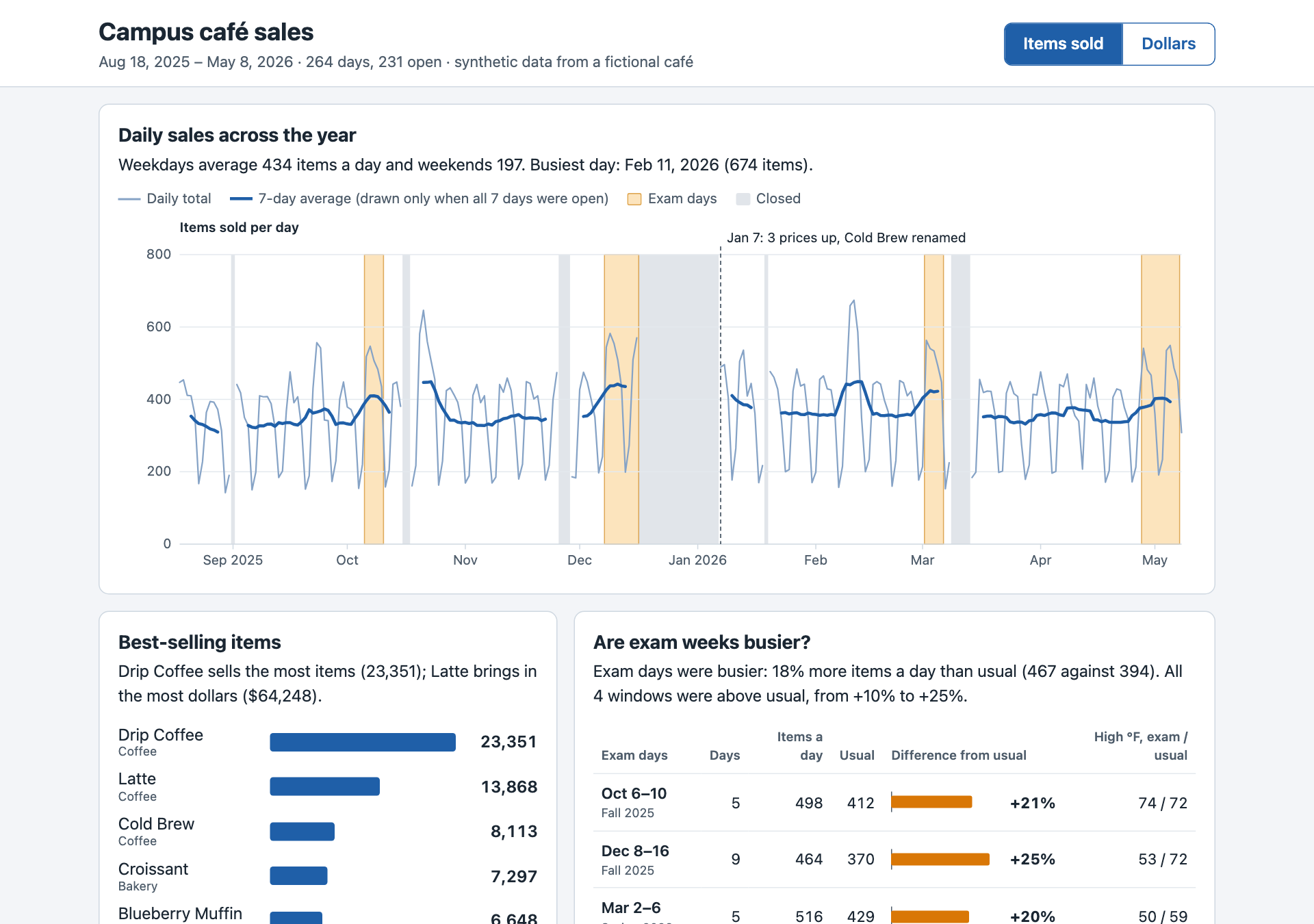
Claude pasted the CSV into the page with cat, confirmed the copy was identical, and ran the page’s own calculation code with macOS’s built-in JavaScript runner to check its numbers: 43 checks, no failures. The page worked on the first double-click. It reported exam days at +18% over ordinary days, and pointed out that the career fair and homecoming weeks outsold every exam week. It also raised the weather as a confounder.
4 Check
The manager already knows one number: what the café took in over the fall semester.
Official fall sales, Aug 18 – Dec 16, 2025$145,205.25
Does your dashboard agree? If it doesn’t show a fall total, ask Claude for it.
Whether it matches or not, make Claude prove it. /goal keeps Claude working until a condition holds, and a separate model checks after every turn:
/goal The dashboard's fall-semester sales (Aug 18 to Dec 16, 2025) match the café's official $145,205.25. If they don't, explain why before changing anything. Prove the final number from the CSV yourself, and don't hard-code it. Stop after 5 turns.Why it might not match: one latte in September was rung up at $45.00. Did Claude flag it in step 1? Did the plan fix it? A figure that’s off by exactly the size of one typo is the kind of thing only a known answer catches.
A wrong number usually points straight at its cause:
| Your dashboard says | What happened |
|---|---|
| $145,205.25 | The $45.00 latte corrected to $4.50 ✓ |
| $148,769.25 | The $45.00 latte counted as rung up: $3,564 too high |
| $144,809.25 | The latte row dropped instead of corrected: $396 too low |
If something on the page looks wrong, show Claude instead of describing it. Take a screenshot to the clipboard (Ctrl-Shift-Cmd-4Ctrl-Shift-Cmd-4 on a Mac, Win-Shift-SWin-Shift-S on Windows), then paste it into your prompt with Ctrl-VCtrl-V (Mac Terminal) or Alt-VAlt-V (Windows) and say what’s off.
The page didn’t show a fall total, so /goal led Claude to add a Totals by term table: Fall 2025 = $145,205.25, matching the official figure to the cent. It showed why the raw CSV says $148,769.25 instead: one latte row priced $45.00, 88 sold, which is $3,564 too much. Its “not hard-coded” check even caught one of its own code comments that contained the number, and removed it.
5 Remember
Claude forgets everything when a conversation ends, except what’s written down. Write what you learned in CLAUDE.md, a file Claude reads at the start of every session in this folder.
Add what we learned to CLAUDE.md: the exam-week dates, that days with zero sales for every item mean we were closed, and that "Cold Brew Coffee" is the same item as "Cold Brew".Run /memory to see it listed, along with auto memory: notes Claude saves for itself as it works. CLAUDE.md is what you tell it; auto memory is what it learns. Press EscEsc to close the list; you don’t need to open anything.
Now test it. Type /clear to start a fresh conversation, then ask:
How much busier were exam weeks than other weeks, per day we were open?It should use your exam dates and skip the closed days without being told again.
Claude wrote a short CLAUDE.md with the exam dates, the closed-days rule and the Cold Brew rename, and asked whether to add the latte fix and the January price rise too. A fresh session with only that file answered the exam-week question using your dates and skipping closed days.
6 Make a skill
A skill is a reusable set of instructions with a name. You run it as a command, and Claude can also use it on its own when it fits. (Skills are what Claude Code used to call custom commands.) Have Claude write one:
Create a skill called house-style that gives any web page we make the NC State look: Wolfpack Red #CC0000 for highlights, dark gray text on white, Arial or Helvetica, a red header bar with the page title, and a footer that says "Synthetic data made for a workshop." Use it whenever you create or restyle a web page.Claude writes .claude/skills/house-style/SKILL.md. This folder had no skills before, so Claude Code isn’t watching that folder yet. Tell it to look once:
/reload-skillsThen run your skill:
/house-style dashboard.htmlReload the page in your browser. If Claude Code says Unknown command: /house-style, run /reload-skills and try again. Change the skill later? Run /reload-skills again.
Now ask for something new, without mentioning the style, and watch whether Claude reaches for the skill on its own:
Make a flyer for the café, flyer.html, announcing longer hours during finals week.When the skill was first run, it wasn’t found: the folder had no skills when the session started. That’s why this page tells you to run /reload-skills. For the flyer, Claude used the house style without being asked. It didn’t know the café’s hours or which finals week was meant, so it left visible blanks, [opening time] and [closing time], rather than invent them.
7 Undo
Everyone makes a change they regret. Make one on purpose:
Make dashboard.html rainbow-colored, with Comic Sans everywhere.Look at it. Then type /rewind (or press EscEsc twice on an empty prompt), pick your rainbow prompt itself, and choose Restore code. Rewind goes back to just before the prompt you pick. Reload: it’s back.
/rewind restores files Claude edited with its own editing tools. It doesn’t undo what shell commands did, such as deleting (rm) or moving (mv) files. For real work, keep copies or use git.
Make it yours
Ten minutes, one agent. Pick one:
- Improve the dashboard: a “sales vs. temperature” chart (do hot drinks sell more on cold days?), a dark mode, a print-friendly version for the manager.
- Build something you’d use: a study timer in NC State colors, a flashcard quiz from your own notes, a weekly planner. Start in a new empty folder:
/exit, thencd ..,mkdir my-project,cd my-projectandclaude, the same on Mac and Windows. - Try your own data, as long as it’s data you’re allowed to share with an AI service.
Give it a finish line Claude can prove from its own work, such as:
/goal every button on the page has code behind it that visibly changes the page, and the page needs no other files. Prove it from the code. Stop after 5 turns.If something goes wrong
| What happens | Try |
|---|---|
| Claude asks a question instead of planning | Answer it. That’s the plan step working. |
| The page opens blank | Paste a screenshot and say “this opens blank when I double-click it.” |
| Your number doesn’t match and you’re stuck | Ask: “List every reason the fall total could differ from $145,205.25, and check each one.” |
| A window offers to install “command line developer tools” (Mac) | Claude tried a tool your Mac doesn’t have. Choose Not Now; it will find another way. |
| Claude has gone in circles twice | /clear and ask again, with what you learned in the first prompt. |
| Claude says “You’ve hit your Opus limit” | Type /model sonnet and carry on. |
| You’re out of time | Download the finished example and compare. |
Checked against Claude Code 2.1.299 on October 14, 2026.