Agentic Coding with Claude
Data Science Special Topics · NC State University Libraries
October 15, 2026
While we get started
Open the materials
go.ncsu.edu/dss-claude
Paid Claude plan? Start the install now: Setup on the materials page.
Free plan, or no account? Pair with a neighbor. You’ll be the one who checks the agent’s work.

Data Science Services
Our services: consulting, workshops and instruction, specialized spaces. What we do: finding data, wrangling data, analyzing data, visualization, geographic information systems (GIS), software access.
Who we are

Our team comes from a variety of academic backgrounds, including nuclear engineering, electrical engineering, industrial and environmental engineering, marine ecology, information science, natural resources, business administration, and geographic information sciences.
How to contact us
How to contact us: go.ncsu.edu/getdatahelp. Email us, book a 30-minute appointment with a Data Science Consultant, or reserve a workstation in the DXL or Dataspace. All communication with the program is through getdatahelp@ncsu.edu.
Today’s finish line
- Claude Code installed and signed in on your laptop
- A dashboard, built by Claude from a messy spreadsheet
- Your plan checked against the boss’s note, before any code was written
- The dashboard’s key number checked against the official answer
-
A
CLAUDE.mdthat remembers, and a/house-styleskill you keep - A link you can share, or a screenshot
- Something of your own, built in the last ten minutes
Why agents
What’s different, and why it changes the skill
A chatbot talks. An agent acts.
Chatbot
- You paste the file in
- It answers in text
- You copy its code out, run it, paste errors back
- You are its hands
Agent
- It opens your files itself
- It runs commands and edits files
- It sees its own errors and tries again
- You steer, and you check
“Without tools, Claude can only respond with text. With tools, Claude can act.” — Claude Code documentation
The loop
The docs put it plainly: “You’re part of this loop too.”
The skill now: set it up, steer it, check it.
What you’re about to install
Claude Code: an AI agent that works inside a folder on your computer.
- It can read and change any file in the folder you start it in
- You choose how often it asks before acting
- The same agent runs in the terminal, the Desktop app, VS Code and the web
Think of it as a capable coworker with access to one folder. Choose the folder on purpose.
Set it up
15 minutes, together
Install
Mac
Open Terminal: ⌘ Space, type “Terminal”
Windows
Open PowerShell: Start, type “PowerShell”
No progress bar. It’s working; give it a minute. When it’s done, read the end for Setup notes (next slide), then open a new terminal window.
Check, then sign in
A version number, like 2.1.299 (Claude Code)
Pick a text style, sign in through the browser, come back. Asked to trust your home folder? No, exit: you’re signed in.
| If you see | Do |
|---|---|
command not found or not recognized |
Run the fix under Setup notes in the install output (it’s also on the Setup page), then open a new terminal |
| Your plan doesn’t include Claude Code | Free plan: pair up today |
| Mac offers “command line developer tools” | Not Now is fine |
A 60-second tour
- The prompt box: say what you want, in plain words
- The mode line below it:
⏵⏵ auto mode on /lists commands;/helpexplains them- Esc stops Claude mid-step; Esc Esc goes back in time
- Shift+Tab changes how much it asks before acting
New to terminals? Anthropic’s terminal guide for new users is linked from the Setup page. Rather not use one? The Claude desktop app has a Code tab that runs the same agent.
Get the starter folder
- Materials page → cafe.zip → unzip it to your Desktop
- Go into the folder (never your home folder) and start Claude Code:
Mac
claude
Windows
claude
- Not found? Type
cdand a space, drag the folder in, press Enter - “Quick safety check” → Yes, I trust this folder
Your status line
- It writes a small script into Claude Code’s settings. If it asks, approve
- Then look under the input box: model · folder · effort · context used
- No branch here: this folder isn’t a git repository
The loop, for real
Campus café sales: read → plan → act → check
The job
You help run a campus café. The manager wants a one-page dashboard:
- how sales moved over the year
- what sells best
- whether exam weeks really are busier
You have a year of register data, cafe_sales.csv, and Claude Code.
What’s in the folder
README.md: what each column means
cafe_sales.csv: one row per menu item per day, August 2025 to May 2026
Synthetic data, made up for today.
1 · Read
- Watch it open the files itself and run commands,
likeBash(wc -l cafe_sales.csv) - A chatbot would have asked you to paste them in
- Copy every prompt from Today’s activity on the materials page
Read its summary. What looks odd in the data?
2 · Plan: a note from the manager
Claude can’t see this note, and the prompt won’t mention it. On purpose.
Predict: will Claude ask for the exam dates, or work them out some other way?
2 · Plan
- The mode line says
⏸ plan mode on: it reads, may ask, then proposes - It asks for the dates? Answer from the note.
- It guesses them from the busiest weeks? Catch it: that makes “exam weeks are busier” true by definition.
- Pairs: the checker reads the plan against the note
Catch it before any code exists
When the plan is ready, you choose:
- Yes, and use auto mode
- Yes, manually approve edits ← once the plan is right
- No, keep planning ← if it isn’t
In rehearsal
Claude asked for the exam dates every time.
Its fallback, if you just said “go”: finals only, missing both midterm weeks, or no exam panel at all.
The café’s two busiest weeks were a career fair and homecoming, not exams.
Hands up
- Whose Claude asked for the exam dates?
- Whose Claude planned to guess them?
- Whose plan already fixed the $45.00 latte?
Same prompt, thirty laptops, different behavior. That’s why you read the plan.
3 · Act
- Approve the first edit or two. Read what it writes.
- Then Yes, and switch to auto mode, or Shift+Tab until the mode line says
⏵⏵ auto mode on(Windows: Alt+M) - Esc any time to stop and redirect
- It takes a while. Don’t type the next prompt until it’s done
| Mode | Claude… |
|---|---|
⏸ manual |
asks before edits and most commands |
⏵⏵ accept edits |
edits, plus file commands like mv and rm; asks before others |
⏸ plan |
proposes; changes nothing |
⏵⏵ auto (default) |
acts; a safety check reviews each action |
While it builds
Two ideas to have ready when it’s done: memory and skills
Claude forgets. Files don’t.
CLAUDE.md: you write it
- A file in your folder
- Read at the start of every session
- Rules and facts it can’t know: definitions, dates, house rules
- “Add this to CLAUDE.md: …”, or
/initfor a first draft
Auto memory: it writes it
- Notes Claude saves as it learns your project
- On by default; you’ll see “Saved 1 memory”
- Kept in your home folder, one set per project
/memoryshows and edits both kinds
Keep CLAUDE.md short: every line is read every time. (The old # shortcut is gone; just ask.)
Skills: instructions with a name
You run it
Type /house-style, like any command.
Claude runs it
When what you ask matches the skill’s description, Claude can pick it up on its own.
Custom commands and skills are now the same thing; old .claude/commands/ files still work. Put a skill in your project’s .claude/skills/, or in ~/.claude/skills/ to use it everywhere. A skills folder that didn’t exist when the session started needs /reload-skills after each new skill or change.
Check it
Open the page, then make sure it’s right
Open it
Windows: ! start dashboard.html. Or just ask Claude to open it. Still building? Let it finish first.
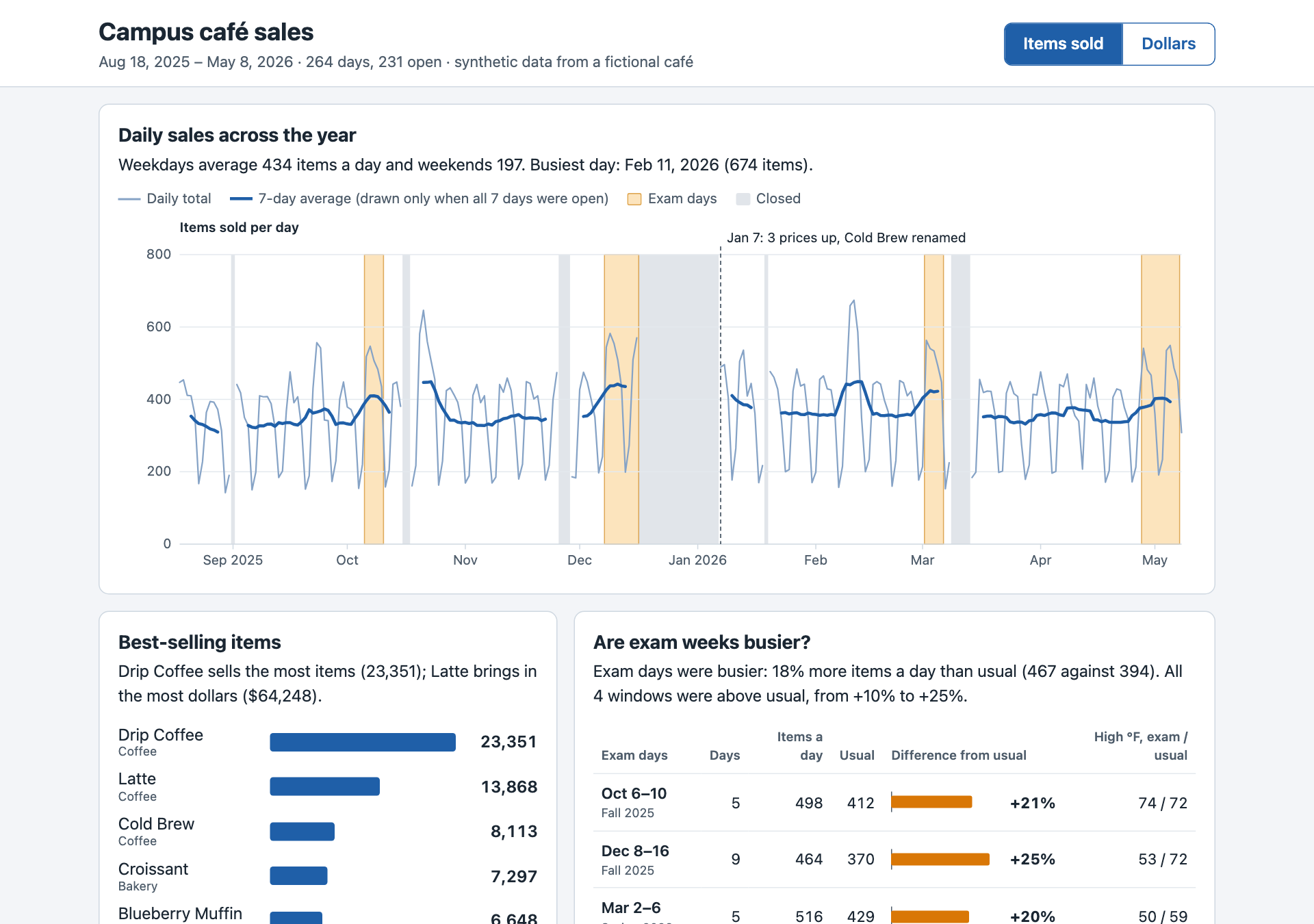
4 · Check
A dashboard that looks right isn’t one that is right. The manager knows one number:
What does yours say? No fall total on your page? Ask Claude for it.
Make it prove it
- Claude keeps working until the condition holds
- A separate model checks after every turn
- Give it a finish line it can prove, rules it must keep, and a limit
What a wrong number tells you
| Your dashboard says | What happened |
|---|---|
| $145,205.25 | The $45.00 latte corrected to $4.50 ✓ |
| $148,769.25 | The $45.00 latte on Sep 16 counted as rung up: $3,564 too high |
| $144,809.25 | The latte row dropped instead of corrected: $396 too low |
Something on the page looks off, like one day towering over the rest? Screenshot it to the clipboard (Mac ⌃⇧⌘4, Windows Win⇧S) and paste it into Claude (Ctrl+V, or Alt+V on Windows).
5 · Remember
/memory to see it → /clear for a fresh conversation → then ask:
It should use your dates and skip closed days, without being told again.
6 · Make a skill
This folder had no skills before, so tell Claude Code to look once. Then run it, and reload the page:
Before and after
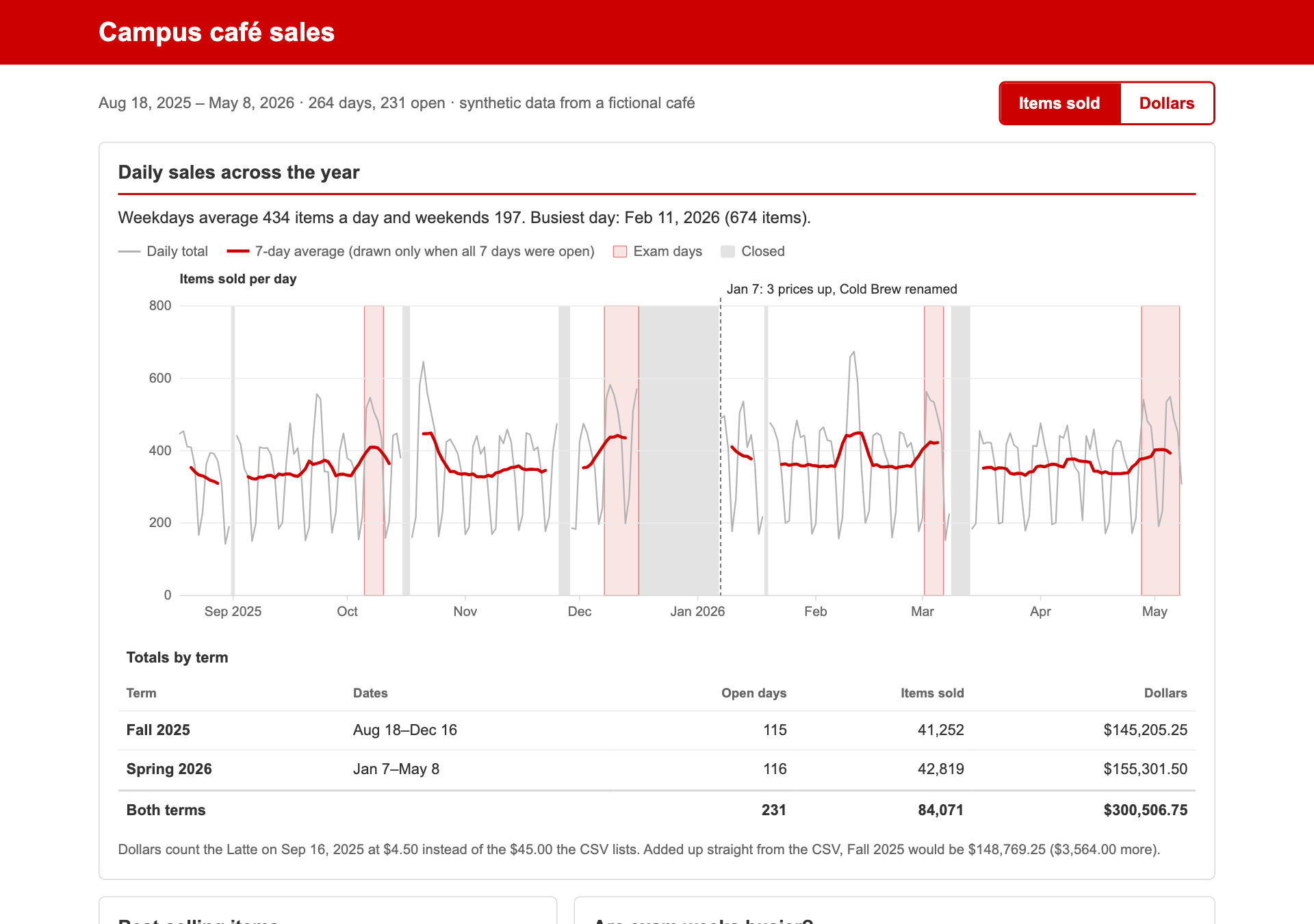
Does Claude reach for it on its own?
No mention of the style. Watch for a Skill(house-style) line, and look at the result.
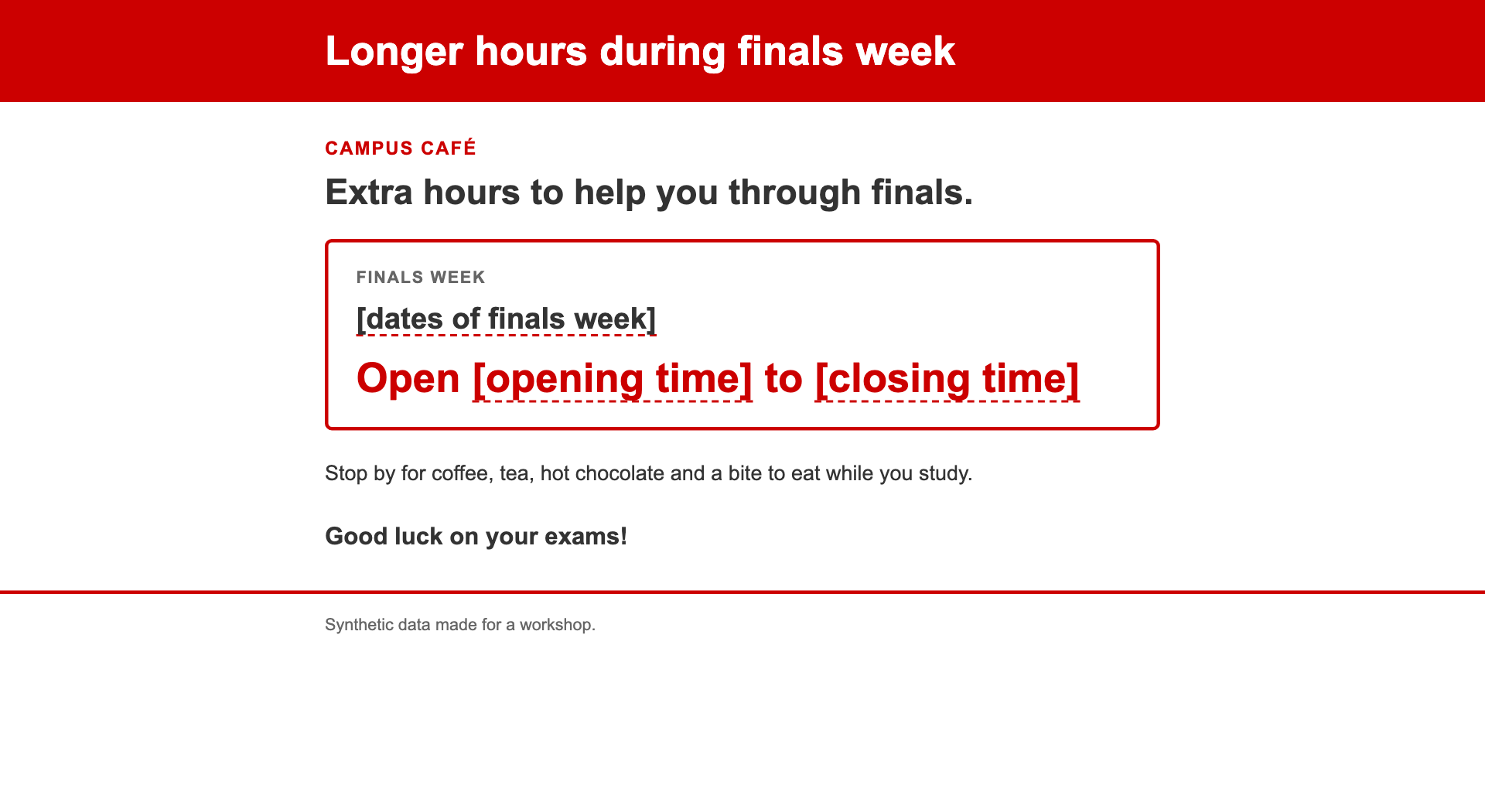
Undo and share
Mistakes are cheap, if you know your undo
7 · Undo
Look at it. Enjoy it. Then:
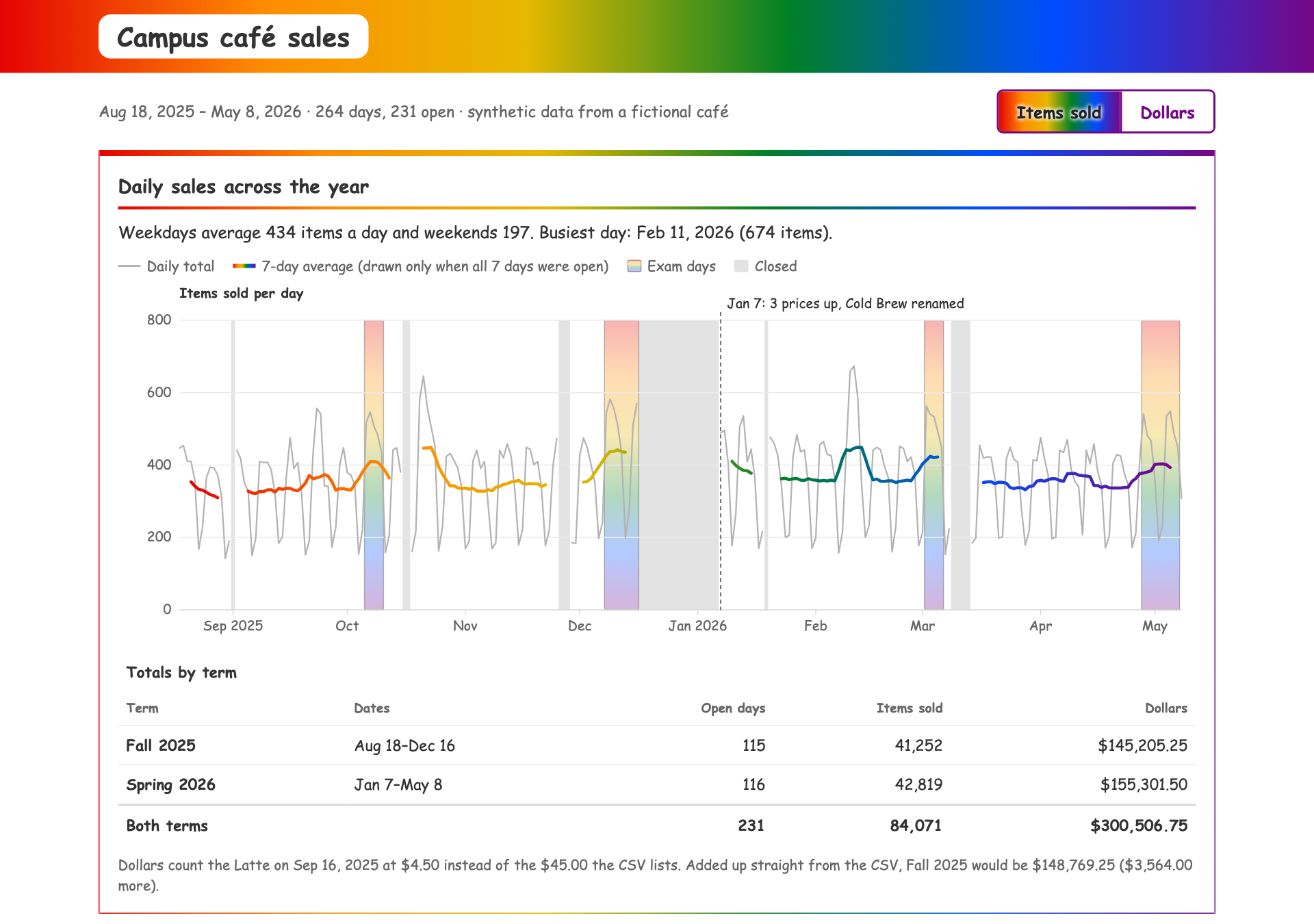
Pick the rainbow prompt itself → Restore code. Reload. (Or Esc Esc on an empty prompt.)
Rewind restores what Claude edited. It can’t undo shell commands like deleting (rm) or moving (mv) files. For real work: copies, or git.
8 · Share
- A private page on claude.ai, with a link
- Share in the page header → a public link anyone can open
- Needs Pro or higher; on Team/Enterprise plans public links may be off
/artifactslists everything you’ve published. Console account? Share a screenshot
Show your neighbor. Volunteers: we’ll put two on the screen.
Make it yours
10 minutes, your call
Pick one
Improve it
A filter, a dark mode, a download button, a chart you wish it had.
Build something you’d use
A study timer in NC State colors. A flashcard quiz from your notes. A weekly planner. Start in a new, empty folder.
Your own data
Only data you’re allowed to share with an AI service. When in doubt, don’t.
Give it a finish line it can prove:
Habits
What to keep doing after today
Seven habits worth keeping
- Plan before anything that matters. Read it for assumptions you didn’t make.
- Write down what it can’t know in
CLAUDE.md. - Give it a way to check its work: a number you trust, a test, a
/goal. - Check one number yourself. Looking right isn’t being right.
- Know your undo.
/rewinddoesn’t undo shell commands. Copies, or git. - Mind the data. Only what you may share with an AI service; follow NC State’s rules for sensitive data.
- Start fresh between tasks with
/clear. Long, tangled sessions get worse.
Did we make the finish line?
- Claude Code installed and signed in on your laptop
- A dashboard, built by Claude from a messy spreadsheet
- Your plan checked against the boss’s note, before any code was written
- The dashboard’s key number checked against the official answer
-
A
CLAUDE.mdthat remembers, and a/house-styleskill you keep - A link you can share, or a screenshot
- Something of your own
Keep going
- On your own: the Study-room bookings activity: same eight steps, a different trap
- On the materials page: the cheat sheet, the finished examples, these slides
/powerupin Claude Code: short interactive lessons- Help with access or setup: go.ncsu.edu/getdatahelp
- Questions: lib-datascienceservices@ncsu.edu
go.ncsu.edu/dss-claude
Thank you
Tell us how we did


Data Science Services · go.ncsu.edu/dss-claude