Introduction to Programming with Python
Data Science Training Intensive · NC State University Libraries
While we get started
Open the materials
go.ncsu.edu/dsti-python
Want a head start? Start Setup on the materials page now.
Install stuck? Colab is the backup: the same notebook, in your browser.
Data Science Services
Our services: consulting, workshops and instruction, specialized spaces. What we do: finding data, wrangling data, analyzing data, visualization, geographic information systems (GIS), software access.
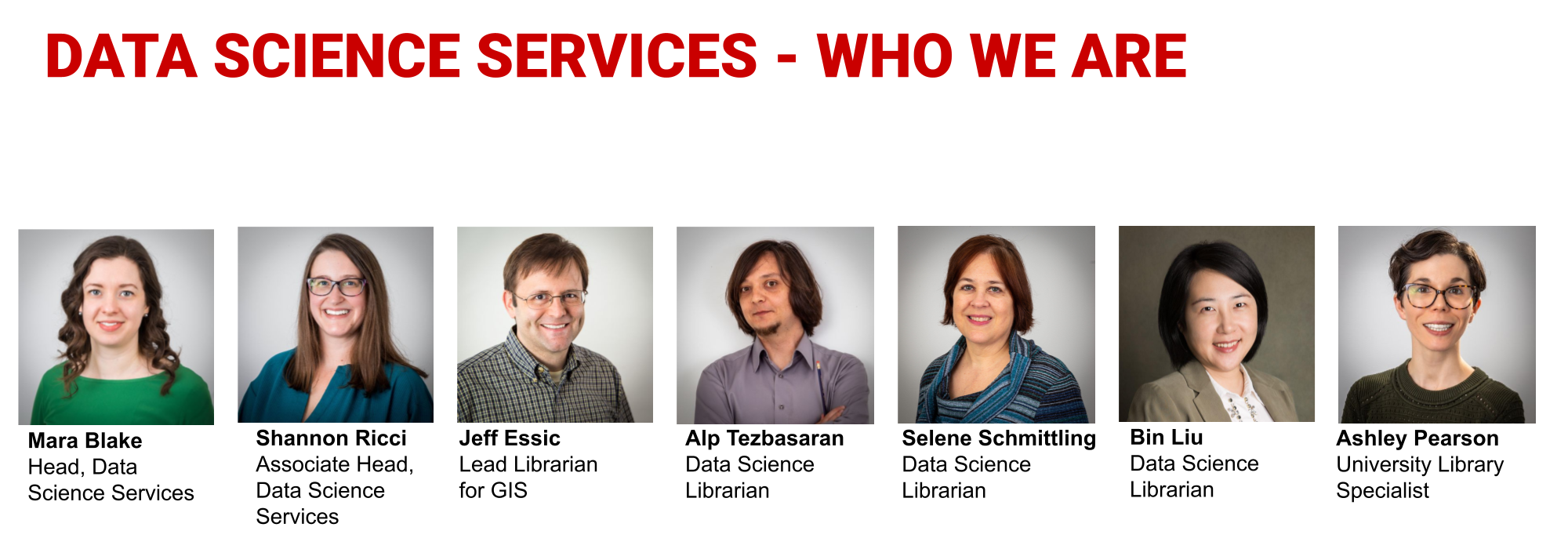
Who we are
![Data Science Services, who we are: Mara Blake, Head, Data Science Services; Shannon Ricci, Associate Head, Data Science Services; Jeff Essic, Lead Librarian for GIS; Alp Tezbasaran, Data Science Librarian; Selene Schmittling, Data Science Librarian; Bin Liu, Data Science Librarian; Ashley Pearson, University Library Specialist]()
Our team comes from a variety of academic backgrounds, including nuclear engineering, electrical engineering, industrial and environmental engineering, marine ecology, information science, natural resources, business administration, and geographic information sciences.
How to contact us
How to contact us: go.ncsu.edu/getdatahelp. Email us, book a 30-minute appointment with a Data Science Consultant, or reserve a workstation in the DXL or Dataspace. All communication with the program is through getdatahelp@ncsu.edu.
Today's finish line
-
Install Python with uv
-
Understand the differences between Python, Jupyter, JupyterLab and Google Colab
-
Navigate the JupyterLab environment
-
Create variables
-
Use basic data types and data structures, such as lists and dictionaries
-
Use arithmetic, comparison, and logical operators
-
Write an
if statement and a for loop
-
Use methods with dot notation
-
Write a user-defined function
Install Python with uv
15 minutes, together
The pieces
Python The language itself.
uv The small tool that installs Python and packages for you.
JupyterLab The notebook app on your laptop. Today's workspace.
Colab The same notebooks on Google's computers. Our backup.
Install uv
Mac
Open Terminal: ⌘ Space, type "Terminal"
curl -LsSf https://astral.sh/uv/install.sh | sh
Windows
Open PowerShell: Start, type "PowerShell"
powershell -ExecutionPolicy ByPass -c "irm https://astral.sh/uv/install.ps1 | iex"
Close and reopen the terminal, then check:
uv --version
Your project folder
uv init --python 3.13 --vcs none --no-package dss-python
cd dss-python
uv add jupyterlab matplotlib
- A folder with its own Python
uv add downloads Python, JupyterLab and matplotlib: the slow step- While it runs: download the notebook from Setup
Already use conda?
conda create -y -n dss-python -c conda-forge --override-channels python=3.13 jupyterlab matplotlib
conda activate dss-python
mkdir dss-python
cd dss-python
jupyter lab
- Windows: use Anaconda Prompt or Miniforge Prompt
- Then the same notebook steps
- Steps on Setup
Your notebook in JupyterLab
Everything from here runs on your laptop
Open the notebook
- Download the learner notebook from go.ncsu.edu/dsti-python, then Setup
- Run
uv run jupyter lab, inside dss-python. Leave that terminal open
- Drag the notebook into the file browser, then double-click it
- Run the bar plot cell
Around 9:30, no chart yet? Switch to Colab and keep going. A helper finishes your install at the break.
Checkpoint: the bar plot cell, section 1
If you see...
uv: command not found |
Open a new terminal, or run source $HOME/.local/bin/env |
| Mac offers "command line developer tools" |
Not Now is fine |
| Windows SmartScreen or antivirus warning |
Flag a helper |
ModuleNotFoundError: No module named 'matplotlib' |
Ctrl+C twice, then cd dss-python, then uv run jupyter lab |
| The notebook isn't in the file list |
Drag it in again. Check you started JupyterLab inside dss-python |
| Still stuck |
Flag a helper: we finish during the break |
Around 9:30: no chart? Switch to Colab.
Backup: Google Colab
- Open go.ncsu.edu/dsti-python, choose Colab backup, then learner notebook in Colab
- Sign in with Google, then click Copy to Drive
- Work in the new tab titled "Copy of introduction-to-programming-with-python.ipynb"
Edits in the original tab aren't saved. Every tab title should start with "Copy of".
Notebook: Introduction to Programming with Python, top cell
Python, Jupyter, JupyterLab and Colab
Jupyter The notebook format, .ipynb.
JupyterLab Runs notebooks on your laptop.
Colab Runs them on Google's computers.
Section 1: Python and JupyterLab
Find your way around
- File browser on the left: your
dss-python folder
- Table of contents in the left sidebar: how we navigate
- Kernel status at the top right
- Run menu
- Ctrl/⌘+S saves
- Only the last line of a cell shows automatically
len?
Put ? after a name for help.
%whos
Lists the variables in memory.
Sections 1 and 2
Two modes
Edit mode Press Enter. For typing in a cell.
Command mode Press Esc. For whole cells. A blue bar marks the cell.
In command mode
- A / B add a cell above / below
- M / Y make it markdown / code
- D D deletes it
In either mode
- Shift+Enter runs a cell and moves on
- Ctrl/⌘+Enter runs it in place
Section 2: Notebook basics
Part 1: Basics
Notebook sections 1 to 5
Variables
A variable is a name for a value. = assigns; == compares.
number = 7
number_times = number * number
print(f"{number} x {number} = {number_times}")
Try it: number_plus Section 3: Variables and data types
Data types, and counting from 0
type(7) # int
type(7.5) # float
"Hello"[0] # H
"Hello"[0:3] # Hel
- Numbers, text, and
True/False
- Python counts from 0
- A slice stops before the end index
Section 3: Variables and data types
Lists and dictionaries
List: a position
cat_toys[1]
Dictionary: a key
birthdays["Spot"]
- Square brackets hold a position in a list, a key in a dictionary
- Lists change in place:
cat_toys[0] = "feather"
- Add a key:
cats["Carla"] = ...
Try it: my_info, and Spot's birthday Section 4: Lists and dictionaries
Arithmetic
7 / 2 # 3.5
7 // 2 # 3
2 ** 3 # 8
7 % 2 # 1
/ always gives a float. // rounds down. Watch the type of each result.
Try it: (400 * 4) / 14 + 39 Section 5: Arithmetic
Break
Five minutes. Part 2 is in this same notebook.
Everything you made is still here. Save: Ctrl/⌘+S. Helpers: finishing flagged installs.
Part 2: Control flow and functions
Notebook sections 6 to 10
Comparison and logical operators
5 > 2
cat_name == "Sally"
x > 0 and x < 10
- Each comparison gives
True or False
- Guess first, then run
- Logic is plain English words
Try it: less than 10 and greater than zero Section 6: Comparison and logical operators
if, elif and else
if cat_name == "Sally":
print("hi")
elif cat_name in my_cats:
...
- The colon starts a block
- The indent is the block
- Skip the indent and you get an
IndentationError
Section 7: if, elif and else
for loops
for fruit in fruits:
print(f"I like {fruit}")
range(5) counts 0, 1, 2, 3, 4. Same indentation rule as if.
Try it: the fruits loop Section 8: for loops
Methods and dot notation
word.upper()
cat_toys.append("catnip")
- Form:
object.method(argument)
- A string method returns a new value
.append changes the list- Polars, next workshop, is chains of these
Section 9: Methods and dot notation
Your own functions
def return_hello():
return "hello"
print shows a value. return hands it back so you can use it again.
Try it: add_nums Section 10: Your own functions
Keep going
What to do after today
What we skipped
On purpose
- Dates and times
- Type conversion
while loops- Reading and writing files
- Most methods
Where it lives The full Basics and Loops and Functions workshops cover all of it. Links are in the notebook's Keep going section.
Keep practicing
- Practice at home in the notebook: each cell stands on its own
- The filled notebook has every answer
- The cheat sheet on the materials page
- It's already on your laptop: next time,
cd dss-python then uv run jupyter lab. On Colab today? Download the .ipynb and drag it in.
- Help: go.ncsu.edu/getdatahelp
- Questions: lib-datascienceservices@ncsu.edu
![QR code for the workshop materials page, go.ncsu.edu/dsti-python]()
go.ncsu.edu/dsti-python
Two data activities
How people spend their day
- The same file the spreadsheets track cleans
- Plain Python first, then Polars
- About 45 minutes
Campus café sales
- Made-up data from a café register
- Fix a bad price, then check the weather
- About 35 minutes
Activities on go.ncsu.edu/dsti-python
Learn on your own
LinkedIn Learning is free with your NC State account. Start from the Libraries' page so you sign in through NC State.
How to sign in: go.ncsu.edu/linkedinlearning
Next: exploratory data analysis with Polars
Today's lists, dictionaries, methods and functions are what Polars is built from.
Next in the series: tables of data, loaded and explored in Python.
More AI workshops from us
- Colab and Chill: A Vibe Coding Approach to Exploratory Data Analysis using AI
- Agentic Coding with Claude
- Working with Local LLMs
- Build Your First Public Portfolio with GitHub: AI, Version Control, and IDE Basics
![QR code for the Data Science Services workshop list, go.ncsu.edu/datavizworkshops]()
go.ncsu.edu/datavizworkshops
Survey time
At 11:30 we stay here in East Learning Lab A, with the other two tracks, to complete the post-training survey.
Survey 1
Beginning of training
Survey 2: now
End of training
Survey 3
After training (3–5 months)
Plus an invitation to a 30-minute interview